How to Book Online Flight Ticket

You can Hold your tickets.. You need Adobe Flash Player to watch this video. ...Ho w to Book Online Flight Ticket with out Credit Card -.


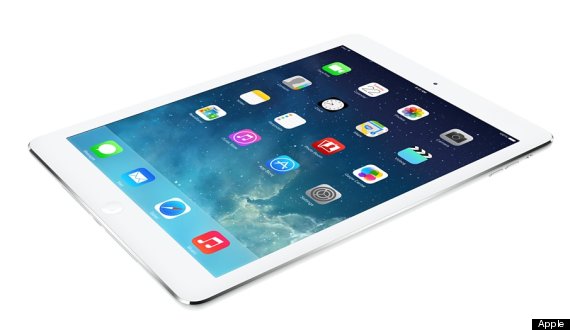
iPad Air Review: Just How Good Is Apple's New Tablet?

Apple's iPad Air is out now starting at £399 (16GB, WIFI only) from Apple.com.

Key Features:
  • 43% thinner bezel, 20% thinner overall
  • Much lighter - just 1 pound
  • A7 processor (64 bit) and the M7 motion coprocessor
  • Twice the performance of the previous generation (and 8X the original iPad)
  • Faster WiFI with 'MIMO' antennas
  • 5MP rear-facing camera
  • Dual microphones for better audio capture
  • 10 hour battery life
The Pitch:
"iPad Air weighs less than half a kilo, and it’s 20 per cent thinner. But even though it’s extremely light, it has a refined aluminium unibody enclosure that feels solid and durable in your hand."
ipad air
Verdict:
Writing iPad reviews is becoming increasingly absurd. Reading them, likewise. Let's face it - you already know that this is a fantastic device. It's the best iPad ever, one of the most objectively impressive too, and one of the most overwhelmingly convincing upgrades Apple has released for a long time.
For unlike in mobile phones, where Apple's still-excellent iPhone is now fighting tooth-and-nail against the top-end Android devices for marketshare, the iPad still has little genuine competition at the high-end.
Google, Amazon, Samsung and now even Argos and Tesco are making healthy gains in their own scrap for the cheaper, seven-inch-ish tablet space. On specs alone, many of these devices are able to match and even exceed the iPad - the Nexus 7's market-leading screen is an obvious example. But if it's apps, design, usability and overall quality, Apple was still leading the pack with the iPad 4.
The iPad Air is just icing on their victory cake.
But what icing.
Before we run away into the details of just what makes the new iPad such a success, let's throw out some caveats. First, there is nothing fundamentally different about the way this iPad works, or what tasks it lets you complete. In case you haven't already experienced iOS 7, there's no on-screen multitasking, 'swipe'-style keyboards or widgets. The device has no TouchID fingerprint sensor, haptic feedback or wireless charging. This is an iPad refined, not an iPad reborn.
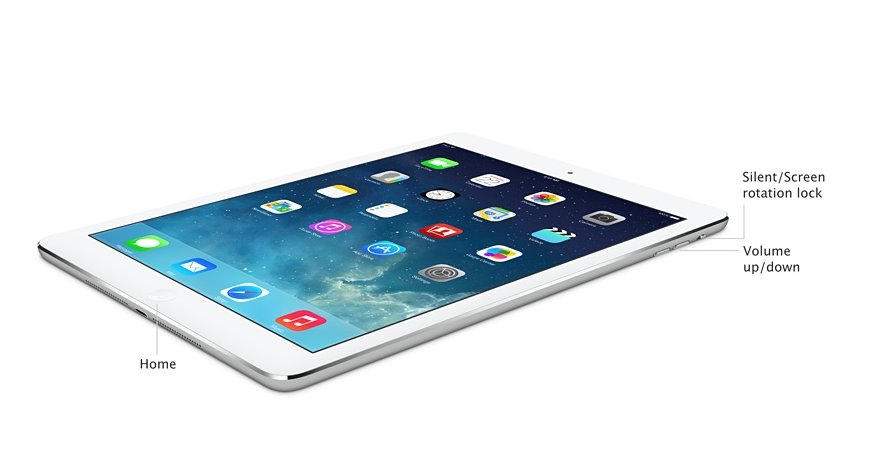
Except, that is, unless you pick one up. The iPad Air is stunningly lighter and thinner than the iPad 4. You can now hold it in one hand just like an iPad Mini, and throw it in your bag without worrying about shoulder ache. The bezels are shrunk into proportion, the corners are still gently curved but crisp and clean. It feels like a superior physical object in every way.
Apple iPads, iPad Minis And More...
1 of 21
Apple
  • Next

The Air performs brilliantly, too. The new A7 chip is said to offer up to twice the performance of the previous generation - though in truth everything performs so smoothly it's sort of hard to notice. That said, it's also clear in games like Infinity Blade III that this machine is a step up. With a decent third-party controller, which are on the way, it would make for a serious gaming machine.
There are other component improvements. The front-facing camera is better, the M7 motion co-processor is built into the machine which is handy for everything from battery life to games, and the batteries offer the same 10 hour life while being 25% smaller. The 4G compatibility is sorted, and the WiFi is now capable of speeds up to 300mb/s.
Then there's the software. With every new iPad you now get the full suite of iLife (Garageband, iPhoto, iMovie) and iWork (Pages, Keynote, Numbers) apps, and access to their online equivalents. None of these are exactly market-leading productivity tools, but they're all easy to use, beautiful and fast. Taken together they add significant value for money to a device already blessed with thousands of stunning apps in its App Store, which needless to say is staggeringly far ahead of the competition when it comes to tablets.
All this you probably know. The surprise is that the cumulative result of these upgrades is a subtly, but significantly different machine. A new device - which is more mobile, more pleasing, more enjoyable and more useful that the iPad you already own.
The iPad Air is a tablet you'll want to take everywhere, that you'll want to use more at home for reading and gaming, and take with you to work as a note-taking device for meetings. In short, everything you thought you'd use your iPad for, but probably never bothered to do. It's just a delight to use, and at a price that while higher than its theoretical competition, is still great value.
That this was achieved through making a large number of superficially small improvements to an already well-honed template is a testament to the company Apple has become. Yes, it would be nice to see it take a few more risks - to push their own assumptions of what an iPad is, and does. But it's also worth remembering that it's taken this long for the original vision to be realised. The result is a masterpiece - not of imagination, perhaps, but of almost everything else

Microsoft offers industry templates, special pricing for Dynamics CRM

The vendor also reaffirms the pending availability of Dynamics AX on the Windows Azure cloud service

Microsoft is hoping to differentiate its Dynamics CRM (customer relationship management) software from the likes of Salesforce.com with a new set of 18 industry templates that fit the application to verticals including sports management, health care and more specialized areas such as prison inmate data.

The announcement was made Tuesday during Microsoft's Convergence 2013 EMEA event in Barcelona.

Microsoft also announced a pricing offer aimed at bundling Dynamics CRM with Office 365. Under the deal, both new and existing Office 365 customers can get up to 40 percent discounts off the list price of Dynamics CRM licenses. The offer is available though March 2014 in 42 markets, according to Microsoft.

Also Tuesday, Microsoft confirmed that Dynamics AX 2012 R3, the next version of the ERP (enterprise resource planning) suite, will arrive in April. Customers and partners will also have the ability to run AX 2012 R3 on Windows Azure, Microsoft confirmed.

However, this will amount to using Azure as a straight hosting service for AX 2012 R3.

It won't be until the next major release of AX that Microsoft will have added features associated with pure SaaS (software as a service), such as multi tenancy, which saves on system resources and allows many customers to be patched and updated at once. Early adopter programs for the latter are expected to begin sometime next year, and AX will remain available in on-premises form.

Microsoft's timeline for cloud ERP "has slipped," said analyst Frank Scavo, managing partner of IT consulting firm Strativa. "It is significant because other providers like Net Suite and Plex do provide a fully functional ERP system in the cloud. Microsoft is still incrementally moving in that direction."

But it's best to keep things in the proper perspective, Scavo added.

"On the one hand Microsoft's Dynamics' rollout to the cloud has been much slower than what I'd like to see," he said. "On the other hand, [once finished] they will have by anyone's definition a full cloud service with full functionality for small and large enterprises. That will put them in a very select group [of vendors]."

Microsoft may have gotten a bit of competitive breathing room for AX on Azure from SAP, which recently announced it would "refactor " its Business ByDesign cloud ERP suite for its HANA in-memory database.

While SAP is keeping a team in place to maintain the current version of ByDesign, the move to HANA will take some time and could push ByDesign off customers' short list until the work is complete.


County seeking new software vendor to replace SAP system

Marin County will favor 'tier two' ERP vendors in the second go-round

Marin County, California, has begun the search for new ERP (enterprise resource planning) software to replace a troubled SAP implementation that generated an ugly legal battle between the county, SAP and systems integrator Deloitte.

County supervisors voted this week to approve an RFP (request for proposals) from vendors who want to take on the job. Officials are focused on "tier two" vendors, which are generally smaller and more focused, and especially ones that have experience in the public sector, said County Administrator Matthew Hymel during a meeting of the supervisory board, which was webcast.

"A big lesson learned [from the SAP project] was around fit for an organization our size and the business that we're in," Hymel said. Tier one ERP vendors such as SAP and Oracle offer "very complicated products that serve Fortune 500 companies," he added.

"Our employees were definitely impacted by our last implementation so they taking this very seriously," Hymel said. "We're all in agreement of the need to do this right."

Given the "pain" caused by implementing SAP, Marin County officials are taking a "belt-and-suspenders," or quite conservative, approach to the new project, he added.

For one thing, the project will stick to phased deadlines, based on readiness. "We're not going to go live unless we're ready," he said. More resources for training users, as well as improved efforts to take in user feedback, are also planned.

"We've really gone out of our way in many cases to ensure our users are heard," said county IT staffer Tim Flanagan, who also spoke at the meeting. "Every department has been involved and included."

Responses to the RFP are due in December and it's hoped that an approved contract will be signed by June.

Marin County wants to save money compared to what it cost to acquire and run SAP on an ongoing basis, and is also open to using products from multiple vendors, rather than trying to find one that says it can handle every functional area, according to Flanagan.

Supervisors offered Hymel and Flanagan praise for their efforts planning the second project.

"I think we've really laid out a good map," said District 1 Supervisor Susan Adams, as she paged through a thick binder containing the second project's details.

The supervisory board's good mood belied the acrimony stirred up by the county's now-settled lawsuit, which reportedly cost it US$5 million in legal fees but netted just $3.9 million in settlement payments.

Marin County has spent at least $30 million on the SAP project, which dates to 2006, and had at one point pursued $35 million in damages. It accused Deloitte of staffing the project with inexperienced consultants, leading to delays and cost overruns.

It also claimed Deloitte and SAP's alleged wrongdoing fell under the federal Racketeer Influenced and Corrupt Organizations Act (RICO), which would have trebled the damages. A judge dismissed the racketeering claims.

Twitter brings new filters to search on mobile

The company's mobile apps were updated to give users more search tools

Users of Twitter's mobile apps have some new ways to refine their search results, now with filters for photos, videos, news and people.

On Tuesday, the company announced an update to its mobile apps for iOS and Android devices, as part of an effort to improve the search experience on those platforms. The update is designed to give users more tools to surface specific tweets or types of content.

Previously, the search tool on Twitter's mobile app grouped many of its results together. The updated apps give users more options: For example, users can search for what their friends are saying. Updates will be coming soon to Apple's App Store and the Google Play Store, Twitter said.

Users can filter their results to display tweets with photos, tweets from the people they follow, tweets with videos, and news. Users can also toggle between all tweets and top tweets in the new version of the app.

"New filters in search help you quickly find exactly the tweets and people you're looking for," said Esteban Kozak, Twitter's search and relevance product manager.

The update is also designed to make it easier for users to find the most popular content on Twitter. A new trending timeline has been added to the "Discover" tab. It will show trends and associated tweets, Twitter said, as well as trending TV shows and nearby events.

Giving users more tools to filter their searches is important for Twitter as its content grows. The social network's foundation was built around 140-character messages, but a range of other media such as photos and videos have since found their way into tweets as embedded content.

Television broadcasters now put content into tweets through Twitter's Amplify advertising program. And Twitter just recently made photos a more prominent part of its service, to the disappointment of some users.

(Source:http://www.itnews.com/internet-based-applications-and-services/71303/twitter-brings-new-filters-search-mobile)

Dropbox Makes Its Play for Business Users

The company will launch a product with special controls to keep company data safe

Dropbox is hoping to capitalize on the growing use of its file hosting service among businesses with a new product built from scratch that is designed to help companies improve workflow processes.

The company on Wednesday announced Dropbox for Business, a paid service that provides Dropbox's bread-and-butter file hosting, but with a smorgasbord of additional features geared toward business users such as sharing restrictions and IT management controls, to help keep data safe.

The service could put a kink in the efforts of companies such as Google and Amazon to offer enterprise-level file hosting. Amazon also on Wednesday announced its WorkSpaces product for desktop computing in the cloud.

Dropbox's new service is designed to simplify how businesses usually share and transfer work files, by eliminating the need to resort to FTP (File Transfer Protocol), outside servers, and to also eliminate the security risks that come with USB thumb drives and email attachments.

"We've thought about all the kinds of crazy things we do that hopefully in the future we won't have to worry about," Dropbox CEO Drew Houston said during the product's unveiling at the company headquarters in San Francisco.

Dropbox for Business is currently in beta mode and is being used by a range of businesses. It will launch worldwide in January. Pricing will start at US$795 a year.

Usage of Dropbox among companies has quadrupled in recent years. In 2011 there were 1 million businesses using Dropbox, while last year the number climbed to 2 million, and this year there are 4 million, he said.

But businesses still represent just a tiny slice of the company's total users. Dropbox, which was founded in 2007, has over 200 million users, Houston said.

Dropbox for Business is an ambitious undertaking for the company. It is a completely rebuilt version of the regular Dropbox service, Houston said, whose development was made easier by the fact that Dropbox has tripled its product development team since last year.

"We've been hiring all these smart people, so we let them rip on it," he said.

The product is designed to take the headaches out of how companies manage their files among employees, and reduce the constant switching between personal and work accounts on people's computers, Houston said. But the service is actually quite complex, with a lot going on under the hood. The new features include remote wiping of data, account transfer options for when an employee leaves the company, and new desktop and mobile apps.

With the service, an employee can pair a Dropbox work account with a personal account, but can still decide where to put files. Employees using a Dropbox work account may only be able to share files with certain people at the company if that's how the account administrator set it up.

Account administrators have a number of controls to manage data. One new administrator feature is a tool called "Sharing Audit Logs," which lets the person see a complete log of all the sharing activity around certain files within the company's Dropbox account.

How to Use iCloud on Your iPhone 5

First and foremost, Apple’s iCloud isn’t an app that you run. It isn’t even physically in your iPhone! What exactly is iCloud? Virtually all of Apple's products — the iPhone, iPad, iPod touch, and Mac computers — are now automatically bound together with this semi-mysterious buzzword.
iCloud was designed for two reasons:
  • It lets you share data. Using iCloud and your Internet connection, data (which includes anything from your Camera Roll to your Safari bookmarks) are automatically shared among all of your iOS devices, as well as your computer. For example, if you take a photo on your iPad, that photo is automatically added to your Camera Roll on your iPhone and to iPhoto on your Mac.
  • It provides online storage. You can save documents to iCloud. You can grab them with your iOS device (including your iPhone) anywhere you can connect to the Internet. iCloud also can store your iPhone backup, which lets you restore your settings and data if you have to wipe your iPhone clean back to factory settings.
iCloud uses your Apple ID to identify the other devices and computers that should synchronize together. Therefore, all of your computers and iOS devices must use the same Apple ID for iCloud to work properly.
You can easily tweak your iCloud connection to synchronize only the data you want to share with other devices and computers.

Set up iCloud for your iPhone 5

Follow these steps to set up iCloud:
  1. From the Home screen, tap the Settings icon.
  2. Tap iCloud.
    image0.jpg
  3. Tap Account.
  4. Set an Apple ID and password.
  5. Set up your iCloud storage plan.
    You automatically get, for free, 5GB of iCloud storage. That’s far more than most iPhone owners will need. You can upgrade to 10GB, 20GB, or 50GB of storage for an annual fee.
  6. Tap the Done button.
    You’re returned to iCloud settings.
  7. Set your iCloud Mail account options.
    Your iCloud e-mail address appears at the bottom of the Account screen.
  8. Tap any switch to turn on or off iCloud synchronization for that information.
    For example, to sync your Contacts list between your iPhone, Mac, and iOS devices, tap the Contacts switch to On. To turn off iCloud syncing for reminders, tap the Reminders switch to Off. Photo Stream and Documents and Data have separate screens with multiple options.
  9. Press the Home button to exit Settings.
If during Step 8 you turn on the Find My iPhone option, you can track down your iPhone from the website. From there, you can play a sound to help you find it. If your iPhone is stolen, you can even remotely lock or completely erase it!
Also, if you install the iCloud Control Panel for Windows, your PC can also join in the fun. The program is free from Apple. However, your PC can only sync Mail, Contacts and Calendars (with Outlook), Bookmarks (with Internet Explorer), and Photo Stream (with the folder you specify).

Check your iCloud storage

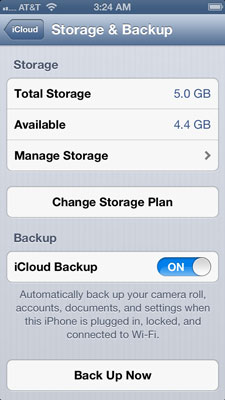
You can check out how much iCloud storage you have left. To monitor your iPhone backup, follow these steps:
  1. From the Home screen, tap the Settings icon.
  2. Tap iCloud.
  3. Tap Storage & Backup.
    image1.jpg
  4. Tap Manage Storage.
    You’ll see the space used by your backups. You can delete backups for devices you no longer have if you want to save iCloud storage space.
  5. Optional: You can also enable or disable iCloud backups of your iPhone's data.

Back up your iPhone 5

Your iPhone can be set up to automatically back up to iCloud. You should always leave your iCloud Backup setting to On (both within Settings and within iTunes on your computer) unless an Apple technician tells you otherwise! If you must reset your iPhone to factory settings, this backup can automatically restore your iPhone's data.
Although iCloud backups are automatic, you can also perform an iCloud backup manually:
  1. From the Home screen, tap the Settings icon.
  2. Tap iCloud.
  3. Tap Storage & Backup.
  4. Tap Back Up Now to start the ball rolling.
    A progress bar shows how much time is left until the backup is complete. Naturally, the more data you have on your iPhone, the longer the backup will take.
For your iPhone to automatically start an iCloud backup, you must have a Wi-Fi connection to the Internet.

iPhone 5s and 5c: Five key differences between them

Apple made history this week by announcing not one but two new iPhones. But which one is right for you?
We've put together a list of the main differences between them, so you can decide which to make room for in your pocket.
iphone 5c iphone 5s side by side

1 Price

The 5c was rumoured to be a budget iPhone, but that turned out to be off the mark.
It'll set you back £469 SIM-free, or starting at £30 on contract (though you'll have to shell out £32 a month for two years). And that's the more affordable of the two new additions to the iPhone range.
iphone 5c price launch
The 5s costs from £549, though it'll be much cheaper on a contract.
Exactly how much cheaper we don't know yet, as you can't pre-order the 5s. But either way, these are the most expensive iPhones ever.

2 Security

touch id iphone 5s
One of the major differences between the two is the fact that the 5s has a fingerprint scanner built into the home button.
Not only does this make the device more secure, as you're not using a PIN code, it also makes it much easier to buy things from iTunes.
Fed up of entering your Apple ID every time you download a song? You won't have to with this, just touch your finger and you're done.
The 5c features nothing of the sort, as it's basically a restyled iPhone 5. Which brings us onto…

3 Colours

iphone 5c rear view official
The 5c is the brightest iPhone ever, coming in a selection of five colours: green, blue, yellow, pink and white. There are optional cases available in those same hues, giving you dozens of potential colour combinations.
The iPhone 5s is a lot more sober, but still comes in more colours than its predecessor. You'll be able to get the 5s in champagne gold, silver, and space grey.
It too has a selection of official cases, but these ones are leather, compared to the 5c's silicone ones. The 5s's case comes in brown, beige, black, yellow, blue, or red.

4 Camera

iphone 5s isight camera
The iPhone 5c has the same camera as the iPhone 5, but the 5s has tons of new imaging skills. The sensor is 15 per cent larger, which should improve picture quality.
There's a wider f/2.2 aperture, letting in more light, which should improve the quality of your low-light shots.
Burst mode takes lots of snaps at once and automatically picks the best, or you can browse them and choose another.
You can now shoot video in slow motion, too.
Nokia has so far ruled the roost when it comes to imaging on a smartphone, but the 5s could well unseat it.

5 New chips

a7 processor iphone 5s
The iPhone 5s features a whole new chipset. The A7 processor replaces the iPhone 5's A6, and should run twice as fast. (The 5c is still stuck with the A6, so may seem a bit sluggish in comparison.)
The A7 should also mean much better graphics in games. But not only that, the 5s also features a new M7 motion coprocessor.
This brings together all the data from the 5s's compass, accelerometer, and gyro motion sensors so it knows exactly how you're moving.
That could pave the way for a whole new generation of fitness tracker apps, which the 5c will miss out on.

The Next Killer App for CoIT

Consumerization of Enterprise IT, commonly referred to as CoIT, is one of the hottest buzzword in town. BYOD (Bring your own device), and to some extent SaaS based Business Apps (in areas such as CRM and HR) are acting as major catalysts for CoIT.


Until now, in most common use cases of CoIT:
you get a preferred mode of access to the business applications (through your own devices),
or, you get to pick an App (in a SaaS model) that you can configure (to an extent) without any involvement of IT or technical folks.

However, real strategic advantage and business value is limited in these options. For successful companies, productivity & workplace efficiency is primarily driven by collaboration & workflow management among employees, partners and customers. Devices and Apps only play a part, but workflows are critical. Hence, BYOD and SaaS are only stepping-stones to the really effective CoIT leverage.

Companies have always wanted to automate and monitor their “Business Processes” (indirectly speaking, workflows), faster and in an agile manner. They dream to be able to do that without getting stuck in the long-drawn projects and devops based processes. And, that is why, Self-Service Business Process (workflow) Automation is the next killer App, for true CoIT.

Let’s consider how Google Apps became a choice of millions of businesses around the world. Users primarily started with Gmail. Then, they moved onto the productivity tools such as Messaging and docs – but they did that as individual users. When small businesses wanted to leverage a seamless ecosystem (without bothering about the training and adoption roadmaps), they picked up Google Apps. It works very well because businesses don’t need to maintain a technology infrastructure. Besides, they don’t need to bother about the devices that their employees use to access these basic productivity & collaboration tools (such as Google Apps). This fits very well with the true nature of CoIT & BYOD.

Many small businesses today run “without any IT support personnel”, thanks to SaaS. And these businesses leverage the technology for basic office productivity, basic collaboration, and for standard SaaS based Business Apps in areas such as CRM or HR.

There are also some SaaS based generic task management Apps that allow you to handle the To-do lists. They allow you to tick-off the work that goes beyond just email and productivity apps at individual level. However, still organizations would still be missing out the woods for the trees, if they’re not able to bring in the “Structured Workflows” comprising of data, process flow, reports and analytics. After all, the business processes provide the competitive leverage to organizations.

Hence, when users start building their “business processes” exactly the way “stuff happens in teams” in their companies (i.e. matching exactly to their needs without cutting the foot to fit the shoe) – then, the real power of CoIT comes to the fore.

In our own experience with KiSSFLOW Usage, we have seen variety of workflows, even “core business processes”, being built by process owners, business owners and power business users in SMB organizations. In larger organizations, the long tail workflow apps (or supporting or situational processes on the fringes of the organization) are being automated. And, we see the trend on a steep rise.

Self-Service Business Process (Workflow) Automation is the next killer App for CoIT.

Microsoft Office for iPhone and Android: Three free alternatives!

Microsoft Office for iPhone and Android: Three free alternatives!
The Gadget Show  Wednesday 07 November 2012
A few leaked snaps of Microsoft Office running on iPad, iPhone, iPad and Android have been spotted by The Verge in the wild, but according to these same reports, you’ll have to pay a subscription fee for full access to the office suite and cloud service.
But if you need to open and even knock up documents on the go, Microsoft Office isn’t your only option. Whether you’re on Android or iPhone here are three excellent alternatives you can use on both platforms already – and they’re absolutely free.
CloudOn brings full fat Microsoft Office to either of the tablet operating system flavours of your choice, letting you feel right at home with the look and feel of the full application. The app syncs your documents through either Dropbox, Google Drive or Box, and lets you move things between each service for both easy access and easy sharing. If you’re itching for Microsoft Office on the go right now, this is essential.
While not quite as fully featured as Microsoft’s full office suite, Google Drive is still simple and effective and lets you create easily sharable documents, spreadsheets, presentations, forms and even drawings that you can access from any web connected device. Fantastic for collaborations and for working remotely, Google Drive is well worth a look, even if you don’t try to cobble together spreadsheets and PowerPoint presentations on the go: you get 5GB of free storage for all your files, from documents to video and music.
While not strictly an office suite, Evernote nicely fills in the gap between idea and execution, allowing you to jot down notes on any of your smartphone devices or tablets, which then sync over to your Mac or PC, letting you get on with the things that matter. Evernote can also copy in all sorts of images, graphs, or tables, making it a great companion to traditional office applications – it even works with the world’s smartest pen.
Tags:

NASA to Bring a 3-D Printer into Space to Produce Tools


Britney Scott / November 3, 2013- NASA is going to launch an innovative 3-D printer having the dimensions of a toaster. This printer would enable the astronauts to produce any kind of spare, part, tool or supply that is required by them during the course of their journey. It is expected that the first 3-D printer would be launched in space in 2014 autumn. The tools and parts that would be made by this novel printer are on display at ‘Made in Space’ in Mountain View, California.


The biggest hindrance or challenge posed to astronauts during their long space missions is that they need to make sure that they have everything such as satellites, spare parts, equipment and tools. Because of this, NASA collaborated with a Silicon Valley company in order to come out with innovative 3D printers that would provide the astronauts a device for producing things whenever the need arises whilst in space and this would enable them to travel uninterruptedly. With this new device, astronauts would have access to this tool factory of sorts by creating objects from plastic layers. At present this printer is used for making exquisite jewelry and doctors use them for making replacement joints. Engineers in NASA labs are looking out to making a formidable printer that would produce rocket pieces and replacement parts that can withstand extreme temperatures.

The inventor of this printer, Andrew Filo who is presently working with NASA on this ambitious project states: “Any time we realize we can 3-D print something in space, it’s like Christmas. You can get rid of concepts like rationing, scarce or irreplaceable.”


This device would enable astronauts to make the necessary critical repair on the International Space Station without worrying for the parts. At present, there are trials going on for the printer and safety is the biggest concern. Furthermore, even though this innovative printer reduces the volume of inventory required on space missions, but it does not omit it entirely as you would still need case filament, raw material and a lot of power for operating the 3-D printing machine.


Whatever will be the outcome; this device would most certainly be a historic development and would impact the space industry in a big way.


Welcome to Nora MIS 750 © 2012 | Designed by LogosDatabase.com, in collaboration with Credit Card Machines, Corporate Headquarters and Motivational Quotes